A Beginner’s Guide to Navigating Google Search Console
by | Aug 14, 2025 | SEO | 0 comments

In the ever-evolving world of digital marketing, understanding how your website performs on Google is critical. That’s where Google Search Console (GSC) steps in—a free, powerful tool that gives you insights into how your website appears and performs in search results.

Whether you’re a blogger, small business owner, or SEO beginner, this Google Search Console guide will walk you through the basics of using GSC effectively in 2025.

🔍 What is Google Search Console?

Google Search Console is a free tool from Google that helps you monitor, maintain, and troubleshoot your site’s presence in Google Search results. It doesn’t directly impact rankings, but it shows how your content is performing, highlights issues, and offers recommendations to improve visibility.

🛠️ Why Should You Use Google Search Console?

Here’s what GSC can do for you:

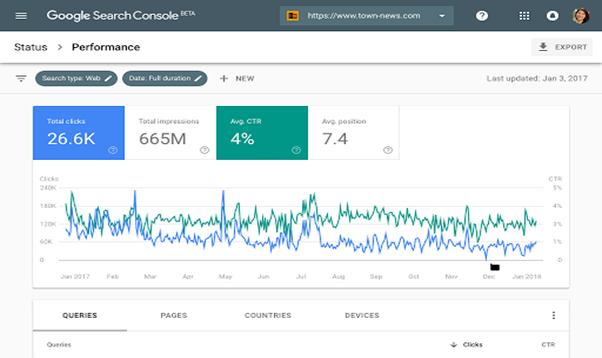
  • Track your website’s search performance (clicks, impressions, CTR, average position, search terms)
  • Identify technical SEO issues (crawling, indexing, mobile usability)
  • Submit sitemaps and request indexing
  • Check for manual actions or penalties
  • Analyze which keywords and pages are driving traffic
  • Inspect how Googlebot sees your website
Google Search Console

🚀 Getting Started with Google Search Console

Step 1: Set Up Your GSC Account

    • Domain property (tracks all versions of the domain)
    • URL-prefix property (only a specific URL version)

We recommend Domain property for full visibility.

Step 2: Verify Website Ownership

Choose one of the following methods:

  • DNS record (recommended for domain property)
  • HTML file upload
  • Google Analytics or Tag Manager
  • Insert HTML tag in your website’s header tag <head>

If you’re unsure, your web developer or hosting provider can help.

📈 Key Sections to Understand in GSC

1. Performance Report

See how your site performs in Google Search:
  • Total clicks – How many users clicked your site from Google
  • Total impressions – How often your site appeared in results
  • Click-through rate (CTR) – % of impressions that resulted in clicks
  • Average position – Your average ranking for queries
👉 Use this to identify top-performing pages and keywords.

2. URL Inspection Tool

Want to know how Google views a specific page?

Use the URL Inspection Tool to:

  • Check if the page is indexed
  • View last crawl date

Submit URL for reindexing after updates

3. Index Coverage Report

Understand how many pages are:
  • Indexed
  • Excluded
  • Having errors
Common issues include:
  • Crawl anomalies
  • Pages blocked by robots.txt
  • Redirect errors
✅ Fix these for better crawlability and SEO health.

4. Sitemap

Submit your XML sitemap (e.g., yoursite.com/sitemap.xml) to help Google discover your content faster.

5. Mobile Usability

Google prioritizes mobile-first indexing. This report shows:
  • Viewport issues
  • Text too small to read
  • Clickable elements too close
📱 Always optimize for mobile users.

6. Experience and Core Web Vitals

Track how your site performs in terms of speed and user experience:
  • Largest Contentful Paint (LCP)
  • First Input Delay (FID)
  • Cumulative Layout Shift (CLS)
Improve these for better UX and ranking signals.

7. Security & Manual Actions

If your site has security issues (malware, hacked content) or has violated Google guidelines, you’ll be notified here.

✅ Beginner Tips for Using GSC Effectively

  • Check GSC weekly to track performance and spot issues early.
  • Compare data month-over-month to monitor SEO growth.
  • Use filters to analyze specific countries, devices, or queries.

Combine GSC with tools like Google Analytics and Google Data Studio for deeper insights.

💡 Real-World Example (Optional Add-on)

Case Study: A local business improved its CTR by 34% simply by optimizing title tags and meta descriptions on its top 5 pages as shown in the GSC Performance report.

🔧 How Sigur Solutions Can Help

Managing your site’s SEO and performance doesn’t have to be overwhelming. At Sigur Solutions, we help clients integrate, monitor, and optimize their websites using Google Search Console and other top-tier tools.

📩 Contact Us today for a free website audit!

If you’ve noticed a decline in website clicks despite maintaining strong search rankings, you’re not alone. The way people search online is rapidly evolving, and zero-click search is one of the biggest reasons behind this shift.

Today, users often get the answers they need directly on Google through featured snippets, knowledge panels, People Also Ask sections, and AI-generated summaries, without ever clicking on a website. For digital marketers and business owners, this creates a major challenge: how do you stay visible when users don’t even visit your site?

The good news? Zero-click search doesn’t mean the end of SEO. It means your strategy needs to evolve.

What Is Zero-Click Search?

Zero-click search refers to a search result where users find the information they need directly on the search engine results page (SERP), eliminating the need to click on a website.

For example:

You search for “What is digital marketing?” and Google immediately displays a definition in a featured snippet.

Or when searching for “weather today”, Google provides an instant answer.

With the rise of Google AI Overviews, this behavior is growing even faster, as Google now summarizes answers from multiple sources at the top of search results.

According to Google’s evolving search experience, the goal is to help users access information faster and more efficiently. This means businesses must rethink how they approach visibility and content strategy.

For more insights into how AI is reshaping search behavior, read our previous blog on The Future of SEO: Preparing Your Content for Generative AI at
https://sigursolutions.com/the-future-of-seo-preparing-your-content-for-generative-ai/

Why Is Website Traffic Changing?

The reality is simple: search behavior has changed.

Previously, users searched → clicked → read.

Now, the journey increasingly looks like this:

Search → Instant Answer → Exit

This doesn’t mean SEO is failing. Instead, search engines are becoming answer engines.

Several factors are driving this shift:

  1. Google AI Overviews

Google now uses AI to summarize information from multiple sources, reducing the need for users to click individual websites.

Learn more from Google Search Central:
https://developers.google.com/search

  1. Featured Snippets

Google extracts concise information and displays it directly in search results.

  1. Voice Search Growth

Voice assistants prioritize short, direct answers, increasing zero-click behavior.

  1. Mobile Search Habits

Mobile users prefer quick answers instead of browsing multiple pages.

For marketers, this means traditional SEO metrics alone are no longer enough. Ranking #1 matters—but visibility without clicks is becoming equally important.

How Zero-Click Search Impacts Digital Marketing

The biggest impact of zero-click search is reduced organic traffic.

However, smart marketers are adapting by shifting focus toward:

  • Brand visibility
  • Authority building
  • Featured snippet optimization
  • AI search discoverability
  • Generative Engine Optimization (GEO)

Instead of only asking:

“How do I rank?”

Businesses now need to ask:

“How do I become the source Google and AI tools trust?”

This is where AI search visibility becomes critical.

If you’re new to GEO, explore our guide:
https://sigursolutions.com/generative-engine-optimization-geo-the-future-of-seo/

How to Adapt to Zero-Click Search

The key to surviving—and thriving—in a zero-click search environment is optimization.

Here are practical strategies businesses should implement:

  1. Optimize for Featured Snippets

Structure your content to answer questions clearly.

Use:

  • Short paragraphs
  • Bullet points
  • FAQs
  • Step-by-step explanations

For example, instead of writing long blocks of text, answer common questions directly:

What is zero-click search?
Zero-click search happens when users get answers directly on search results without visiting a website.

This increases your chances of appearing in snippets.

  1. Focus on Topical Authority

Search engines trust websites that consistently publish high-quality content around a specific subject.

Instead of isolated blogs, build content clusters around:

  • SEO
  • Website development
  • Social media marketing
  • AI search optimization

This helps improve both search visibility and authority.

  1. Optimize for AI Search Engines

Search is no longer limited to Google.

Tools like ChatGPT, Gemini, and Perplexity are influencing how users discover information.

Content should be:

  • Well-structured
  • Conversational
  • Fact-based
  • Easy to summarize

Our blog on A Practical Guide to GEO: How to Optimize Your Content for AI Search Engines explains this in detail:
https://sigursolutions.com/a-practical-guide-to-geo-how-to-optimize-your-content-for-ai-search-engines/

  1. Measure the Right Metrics

Instead of focusing only on clicks, track:

  • Brand impressions
  • Engagement
  • Search visibility
  • Featured snippet appearances
  • Search Console performance

Google Search Console remains one of the best tools to understand traffic shifts and user behavior.

The Future of SEO in a Zero-Click World

Zero-click search isn’t killing SEO—it’s transforming it.

Businesses that rely only on traditional rankings may struggle, while those that prioritize visibility, authority, and AI optimization will continue to grow.

The future belongs to brands that create helpful, structured, and trustworthy content that search engines want to feature.

In a world where users increasingly get answers instantly, your goal is no longer just earning clicks—it’s becoming the trusted source behind those answers.

The rise of zero-click search is changing website traffic patterns, but it also creates new opportunities for brands willing to adapt.

By optimizing for featured snippets, improving AI search visibility, and embracing Generative Engine Optimization (GEO), businesses can remain visible—even when clicks decrease.

Search is evolving. The question is: Is your strategy evolving with it?